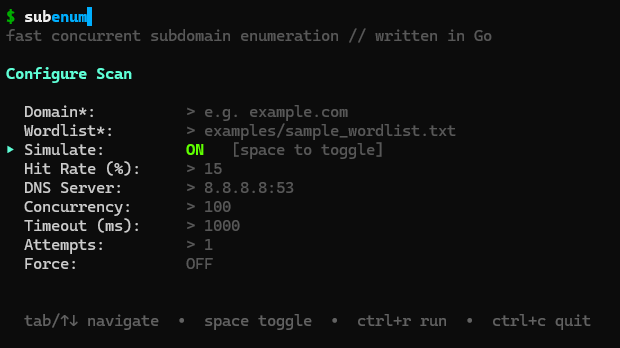
subenum brute-forces subdomains from a wordlist, then tells you how much of the answer to trust. Each lookup is counted as resolved, NXDOMAIN, timeout or refused, and every run ends with a verdict a script can check.
complete12 of 5000 lookups failed (timeout 9, refused 3, other 0), under 1%
A missing name is only news if the lookup got an answer.
When resolvers time out, a wordlist scan doesn't fail loudly. It returns fewer names and looks finished. subenum keeps a ledger of every lookup and grades the run, so you know whether “not found” means not there or not asked.
The verdict and its reason land in -stats run.json and on the last line of -format jsonl. One jq call turns it into a pipeline gate.
jq -e '.verdict == "complete"' run.json
completeunder 1% of lookups failed
12 of 5000 lookups failed (timeout 9, refused 3, other 0), under 1%
degraded1% or more failed, or the run was cut short
71 of 5000 lookups failed (timeout 64, refused 7, other 0)
unreliableover 20% failed; the scan stops itself
the reliability guard aborted the scan: 412 of 1800 lookups failed (timeout 398, refused 14, other 0)
0%1%20%100%
What you can rely on
Each of these is a flag or a field you can check for yourself, not a promise in a README.
Resolver pools that can't lie to you
Spread queries across many resolvers. Failing ones are benched, every hit is re-checked against your trusted resolver before it's printed, and canary checks catch a resolver that hides names that exist.
-r resolvers.txt -dns-server 9.9.9.9
Wildcards, including rotating ones
subenum fingerprints wildcard answers before the scan and learns CDN pools that rotate. An inconclusive check is reported as inconclusive, never as “no wildcard”.
"wildcard": true, "wildcard_filtered": 112
A rate limit you can quote
-rate caps packets on the wire, counting retries and every record type, so the number in your rules of engagement is the number you send.
-rate 200 "achieved_qps": 198.6
Scope that holds
Excluded names are never queried, not filtered afterwards. Exact names and *.parent patterns, inline or from a file.
-exclude '*.corp.example.com'
Takeover hints
CNAMEs that dangle or point at takeover-prone services such as S3, GitHub Pages, Heroku and Azure are flagged for you to verify by hand.
TAKEOVER?=dangling:heroku
Change detection
Compare against the last run and print only names that appeared or disappeared. Exit code 4 means something changed.
-diff previous.jsonl
Encrypted transport
Send queries over plain DNS, DNS over TLS or DNS over HTTPS by changing one address.
-dns-server tls://1.1.1.1
One static binary
No runtime, no services, no API keys. A 5,000-entry wordlist is built in, so subenum yourdomain.com works out of the box.
go install github.com/TMHSDigital/subenum@latest
Run it the way your work runs
Resolved names go to stdout, one per line, so they pipe cleanly. Progress and the per-outcome breakdown go to stderr.
A thorough scan over a resolver pool at a fixed rate, with results and the run report written atomically. The job fails unless every lookup was accounted for.
subfinder covers passive sources. puredns, shuffledns and dnsx are built for raw mass resolution. subenum is the active brute-force step for when you need to defend the result: a single binary that shows its working.
It also teaches. -simulate gives marked, reproducible output with no network traffic, and -tui puts every option in a form.
subenum -tui
Start with one command.
go install github.com/TMHSDigital/subenum@latest && subenum -simulate example.com