Getting started
subenum brute-forces subdomains by resolving a wordlist against a target domain with a concurrent worker pool. This page takes you from install to a scan you can trust, in about five minutes.
Authorized use only. Only scan domains you own or have explicit written permission to test.
Install
With Go 1.26 or newer:
go install github.com/TMHSDigital/subenum@latest
Or download a static release binary for Linux, macOS, Windows or FreeBSD, or run the container image:
docker run --rm ghcr.io/tmhsdigital/subenum:latest -simulate -w /home/nonroot/examples/sample_wordlist.txt example.com
The Docker guide covers mounting wordlists and writing results to the host.
Try it without touching the network
-simulate answers every query locally and marks the output as simulated, so you can learn the tool without sending a single packet:
subenum -simulate -hit-rate 20 example.com
Pass -seed to reproduce a run exactly. For realistic scenarios such as wildcards, rate limits and failing resolvers, work through the Labs.
Run a first scan
subenum ships with a 5,000-entry wordlist, so a domain is all it needs:
subenum yourdomain.com
Resolved names stream to stdout, one per line, so they pipe cleanly into other tools. Progress, diagnostics and the per-outcome breakdown go to stderr. Use your own wordlist with -w, and ask for more record types with -type:
subenum -w big-wordlist.txt -type A,AAAA,CNAME -show-records yourdomain.com
With -show-records, each line carries its records, and CNAMEs that dangle or point at takeover-prone services get a TAKEOVER?= hint to verify by hand.
Read the verdict
Every lookup is classified as resolved, nxdomain, timeout, refused or other. Write the counts to a report with -stats:
subenum -w big-wordlist.txt -stats run.json yourdomain.com
The report ends in a verdict:
| Verdict | Meaning |
|---|---|
complete |
Under 1% of lookups failed. A name that isn’t listed was asked about and doesn’t exist. |
degraded |
1% or more failed, the run was interrupted, or -max-queries stopped it early. The result is usable, but some names are unknown. |
unreliable |
More than 20% failed. subenum stops the scan rather than return a quietly incomplete list. |
The reason field says why, for example 12 of 5000 lookups failed (timeout 9, refused 3, other 0), under 1%. Gate a pipeline on it:
jq -e '.verdict == "complete"' run.json
Scan at scale, politely
For larger wordlists, spread queries over a resolver pool and cap the rate:
subenum -w big-wordlist.txt -r resolvers.txt -rate 500 -type A,AAAA,CNAME \
  -format jsonl -o results.jsonl -stats run.json yourdomain.com
-rrotates over healthy resolvers, benches failing ones, and re-checks every hit against-dns-serverbefore reporting it.-ratecaps packets on the wire, including retries and every record type.-excludeand-exclude-filekeep out-of-scope names from ever being queried.-dL domains.txtscans many apex domains, each as its own scan.
Use the terminal UI
subenum -tui
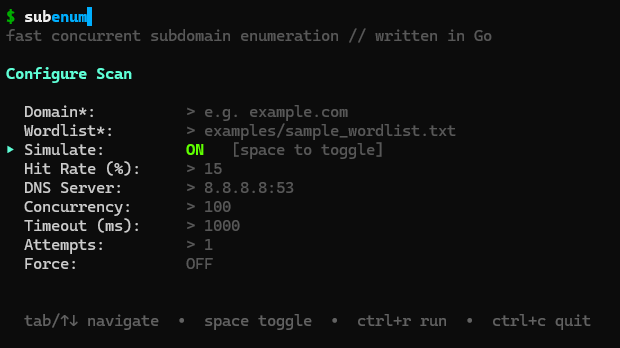
Fill in the form and press ctrl+r to scan. Last-used values are restored on the next launch.
Next steps
- Every flag and exit code: CLI reference
- Get told when names appear or disappear: Monitoring
- Embed the engine in your own tool: Go library
- How the pieces fit together: Architecture